API Overview
Last updated: December 18, 2025
The MIR API lets partners submit user activity and query neutral history signals. Here's what each capability does and why it matters.
Vocabulary: terms used on this page (participation history, tier, actor, claim, ALLOW / STEP_UP / LIMIT / DENY, decision_correlation_id, whyRec, claimStatus, etc.) are defined in the MIR glossary.
Core Capabilities
Submit Events
When users do things on your platform -- complete purchases, post reviews, finish projects -- you tell MIR about it. These events build the user's portable participation history that travels with them across the internet.
Events are simple: who did it, what happened, and optionally how significant it was. MIR handles the rest.
Query History Signals
Before making decisions about a user, ask MIR what history exists. You'll get neutral facts: how many events, how many platforms, how recent. Use this as context for your own judgment -- MIR doesn't tell you what to decide.
History tiers (0, 1, 2, 3) tell you depth only -- not quality, not trustworthiness. Tier 0 isn't negative -- it just means no recorded activity yet.
Account Linking
Enterprise partners submit events for their entities -- employees, contractors, AI agents, and service accounts -- via the API. Linking is managed by the organization as part of its infrastructure. Activity on your platform builds each entity's participation history.
For enterprise partners, linking is organization-managed. For employees and contractors who also operate across other MIR partner platforms, cross-platform history becomes available when multiple partners contribute events for the same linked entity.
Available Endpoints
POST /events
Submit a participation event for a user on your platform. Creates the user record automatically if they don't exist yet.
POST /policy/evaluate
Evaluate an action at the point of decision. Pass the actor (human or service), the action being attempted, and optional resource context. Returns ALLOW, STEP_UP, LIMIT, or DENY based on the entity's accumulated participation history, plus claim status and tier information. Add ?debug=true for full signal breakdown.
{
  "actor": { "type": "human", "id": "emp-12345" },
  "action": "data.export_pii"
}
actor.type is "human" or "service". actor.id is your org-scoped identifier for the entity (the same value used as userExternalId when submitting events). Call GET /policy/actions for the registered action list.
POST /policy/evaluate/bulk
Evaluate up to 100 actions in a single request. Useful for batch authorization checks or pre-computing decisions for a queue of pending actions.
GET /policy/actions
List all available policy actions and their tier requirements. Use this to discover what actions the policy engine recognizes and what tier is required for each.
POST /claims
Submit a claim against an entity -- chargeback, fraud, policy violation, abuse, suspension, or identity dispute. Claims surface in policy responses via claimStatus (clean, flagged, contested) but do not affect tier. MIR records the claim. Your system decides what it means.
GET /events
List events you've submitted. Useful for debugging and verifying your integration is working.
Authentication: All partner endpoints require your API key in the x-api-key header. You receive this when your partner application is approved.
Idempotency
MIR supports idempotent submission on POST /events and POST /claims. Submit an Idempotency-Key header (a unique client-generated string) on the first request; subsequent requests with the same key replay the original response without creating a duplicate record. Cached responses persist for 24 hours.
Replay
A repeat request with the same Idempotency-Key returns the original status code and body verbatim, plus an X-Idempotency-Replay: true header. Use this header to detect replays in your client.
POST /v1/events
x-api-key: ...
Idempotency-Key: tx-2026-05-20-001

# First call: 201 Created, returns event body
# Repeat call: 201 Created, X-Idempotency-Replay: true, same event body
Concurrent submission: 409 IDEMPOTENCY_IN_PROGRESS
If two requests with the same Idempotency-Key arrive simultaneously, exactly one wins and processes the event. The other receives:
HTTP/1.1 409 Conflict
Retry-After: 1
Content-Type: application/json

{
  "error": "A request with this Idempotency-Key is currently in progress. Retry after the in-flight request completes.",
  "code": "IDEMPOTENCY_IN_PROGRESS"
}
Clients should retry on 409 IDEMPOTENCY_IN_PROGRESS after the Retry-After delay (typically 1 second). The retry returns the canonical 201 response with X-Idempotency-Replay: true once the original request has completed. This guarantees exactly one event is created regardless of concurrent submission patterns (retry storms, parallel workers, network-timeout-and-retry).
Auto-deduplication (no header)
If you omit the Idempotency-Key header, MIR auto-generates a deduplication key from a hash of the payload (partnerId + userExternalId + eventType + occurredAt). Identical payloads submitted within 24 hours are deduplicated automatically; auto-dedup replays return both X-Idempotency-Replay: true and X-Idempotency-Auto: true. Pass an explicit Idempotency-Key when you need control over the dedupe window (e.g., re-submitting a corrected payload that should replace, not collide with, a previous attempt).
Agent guardrail
Agents typed as AI_AGENT with requireIdempotency: true must submit an Idempotency-Key header on every event. Requests without the header return 400 AGENT_IDEMPOTENCY_REQUIRED.
Agent Management (Enterprise)
Enterprise partners can register AI agents and service accounts with scoped permissions, event-type allowlists, and independent API keys. The full agent lifecycle is managed through the API — no portal required.
POST /v1/agents
Register an agent with a name, type (AI_AGENT or SERVICE_ACCOUNT), permission preset, and allowed event types. Returns a scoped API key shown once.
GET /v1/agents
List all agents for your organization with status, auth mode, and last activity.
POST /v1/agents/:id/suspend · /revoke · /reactivate
Suspend temporarily, revoke permanently (nulls the key hash), or reactivate a suspended agent. All actions are instant and audited.
POST /v1/agents/:id/key/rotate
Generate a new API key. The old key is invalidated immediately.
AI Agent Guardrails: Agents typed as AI_AGENT enforce idempotency, cap bulk operations, block the admin preset, and require an explicit event-type allowlist. Full documentation is available in the Enterprise Dashboard.
Agent Genealogy
When AI agents spawn subordinate agents, MIR tracks the full lineage — who created whom, at what depth, and under which enterprise. MIR records the genealogy; your enterprise decides what to do about it.
POST /v1/agents/:id/spawn
Spawn a child agent from an existing parent. The child automatically joins the parent's enterprise with inherited (never escalated) permissions. Requires enterprise spawn policy to be enabled.
GET /v1/agents/:id/lineage
Returns the full spawn ancestry chain from root orchestrator to self, plus direct children. Use this to reconstruct how any agent came to exist.
GET /v1/agents/tree
Returns the complete agent genealogy tree for the enterprise. Filterable by root agent ID. Shows spawn depth, membership source, and status for every agent in the hierarchy.
POST /v1/agents/:id/revoke-descendants
Kill switch — revoke an agent and all of its descendants. API keys are nullified permanently. Each revocation is individually audited.
Spawn guardrails: Child agents can never have more permissions, higher rate limits, or broader event-type access than their parent. Enterprise policy controls max spawn depth and optional human approval thresholds.
Error Handling
MIR API errors are returned as JSON with an error field and, where helpful, a hint field:
{ "error": "Missing required field: actor.id", "hint": "Provide an org-scoped identifier for the actor" }Infrastructure errors: During brief deployment windows or if all nodes are unavailable, the load balancer may return an HTML 503 Service Unavailable response instead of JSON. Your client should treat any non-JSON response as a transient error and retry with exponential backoff. These windows typically last under 60 seconds.
What MIR Doesn't Do
- No scores or ratings. MIR returns tier-based signals (event count + history age), not opaque trust scores. Deterministic, not ML.
- No decisions. MIR returns recommendations (ALLOW, STEP_UP, LIMIT, DENY). Your system decides what to do with them.
- No identity verification. The partner is responsible for identity integrity. MIR records what that identity did over time.
- No free-form metadata. Events carry no payload data by design. No subject-level PII -- external IDs from partner-submitted events are SHA256 hashed. Account-holder login emails and partner admin contacts are stored as operational PII, governed by the DPA.
- No data selling. Entity history exists to serve the entities and partners, not to be monetized.
Where MIR Sits in the Stack
MIR provides the evidence layer. It does not enforce execution authority, and execution authority systems do not depend on MIR to function. Both layers stand alone. Together, they create a stronger, auditable model: evidence anchored independently, authority resolved at execution.
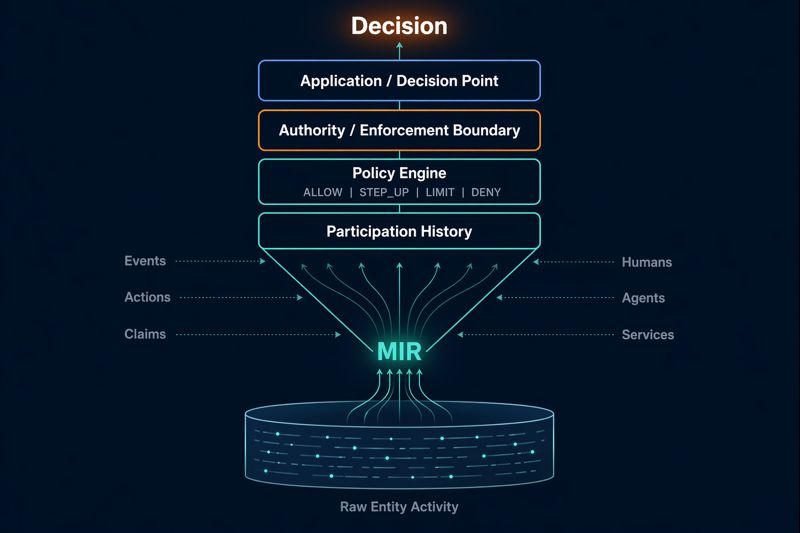
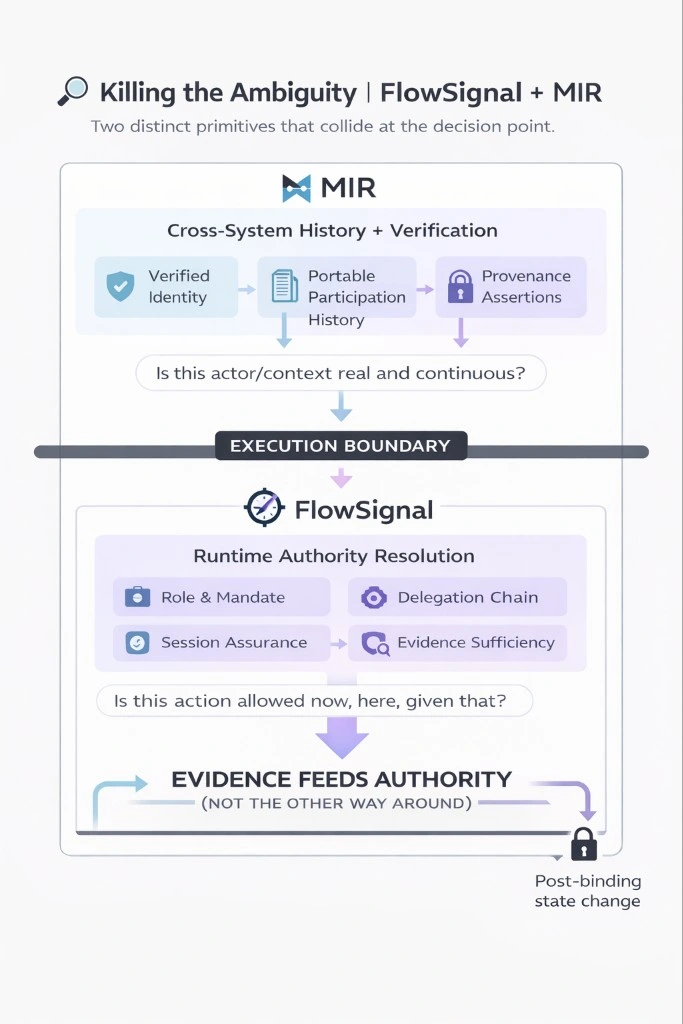
Diagram by Graham Brimage, Founder of FlowSignal. Used with permission.
- MIR (Evidence Layer): What has this entity actually done? Accumulated participation history, tier-based signals, claim status -- available at the point of decision.
- Execution Authority (e.g. FlowSignal): Is this action allowed here, given that? Runtime authority resolution, delegation chains, session fitness, mandate verification.
Evidence feeds authority, not the other way around. MIR tells you what an entity has done. The execution layer decides whether that is sufficient to proceed. Neither layer makes the other's decision.
Event Types
Events use the format category.action, like transaction.completed or
account.verified. MIR accepts a fixed set of event types. Unknown types are rejected with a 400 INVALID_EVENT_TYPE error.
Categories include commerce (transaction.*), account (account.*), community (review.*, rating.*), messaging (message.*), AI (ai.*), gig economy (gig.*), lending (lending.*), social (social.*), and signals (signal.*). The
Integration Guide has the complete event type reference.
Ready to Integrate?
The Partner Guide has everything you need: code examples, event type reference, and implementation patterns.
Partner Portal Integration GuideQuestions?
If you're evaluating MIR or have questions about the API, reach out. We're happy to discuss your use case.